Provisioner Tasks User Guide
Learn how to create single cards in the webportal and the mobile app, how to edit existing cards, create bulk card requests, work with cardholder requests and more!
Frequently Asked Questions
Reporting
To create reporting the most common methods are:
Flex Data report
RTA Report
A custom MIS report
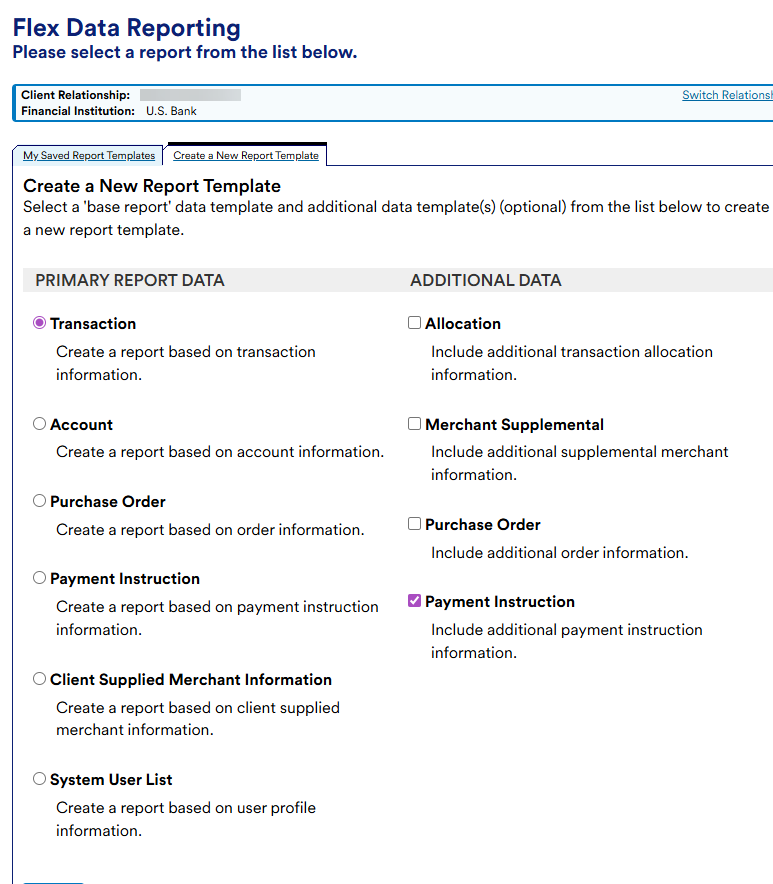
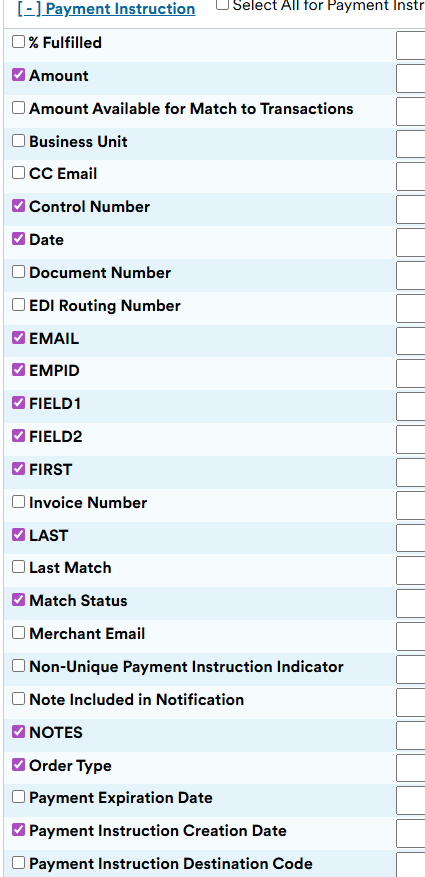
It is crucial to remember that when creating reporting and Instant Card is essentially a payment instruction. So, if you want data like the name of the card holder, you will need to ensure you’re pulling payment instruction data and its custom fields.
For example, with Flex Data you will want to select Payment instruction when creating a report:
Ensure you select custom fields: FIRST, LAST, FIELD1, FIELD2, NOTES, EMPID, PHONE, EMAIL
Spending ‘pro-tips’
Hotels – Hotels can technically accept Instant Card. However, some locations may demand to see physical plastic cards at check-in. This comes down to who is behind the counter and what their policy and procedures are.
Workarounds:
Utilize a hotel chains mobile app for check-in/check-out
Plugin your Instant Card details to the app
Manual entry – ask the front desk to perform a manual entry. If they are concerned about a name not being present on a card, open the profile screen in the app to show you are the authorized user that is logged in. this is NOT fool proof but could create a connection to a user’s ID and their authority to use the card.
Car rentals – Car rentals in general don’t want to accept virtual cards when picking up a vehicle. Some companies will offer the ability to bypass customer service by using their apps. These options should work without issue
General tap-to-pay – As technology and hardware progresses it’s crucial to remember to ‘go-slow’ when performing tap-to-pay in general. Depending on the merchant and the system they have, a lot of human error can take place when it comes to timing, where you place the phone on the POS, etc. If errors at a merchant occur, try again, a different POS if possible or consider if that merchant has an online app that you can input your Instant Card info into.
Why can’t I create a card?
There are numerous possibilities why card creation could fail. The following are a list of the most common reasons that are mostly based on the setup of the clients’ program:
The provisioner is trying to send a card to an email address registered as a higher level role
Custom fields are not built, or were not built properly (AXOL)
SUA pool is empty (AXOL)
SUA pools are not linked properly (AXOL)
OSN was not added to System IDs (AXOL)
us-bank-cps-services-USB-CPS-Services-InstantCard2
car-7004-usb-cps-services-expensewizard
Wrong Payment Account ID was input in the administrator screen (IC Administrator portal)
If these options have been exhausted, escalate to the product team.
©2024 U.S. Bank. All trademarks are the property of their respective owners.
You may not reproduce this document, in whole or in part, without written permission.
CAT ID: NA