Instant Card general requirements user guide
Find out what currencies, languages and other important features are in the Card program.
General requirements
Welcome to your Card program
What is a virtual card?
A virtual card works the same as any plastic card, only it is virtual.
No plastic to lose, damage or have stolen.
How is it used?
Cardholders have the card data on their cell phone.
Using that data, they can make purchases either by:
- Providing the merchant the card data
- Use tap and pay
Languages
Languages available are English and Canadian French in both the web portal and mobile app.
Your smartphone or browser automatically detects the language you are using based on your phone or browser settings and displays the mobile app or web portal in your selected language.
Note that emails for customers in Canada include verbiage in both English and Canadian French.
Currencies
What currency is the card issued with?
Systems
Which systems you will use depends on your role.
- Mobile app - You will receive an email with directions to download
- Card web portal- You will receive an email with directions to download
- Access Online - Contact your Relationship or implementation manage
User roles
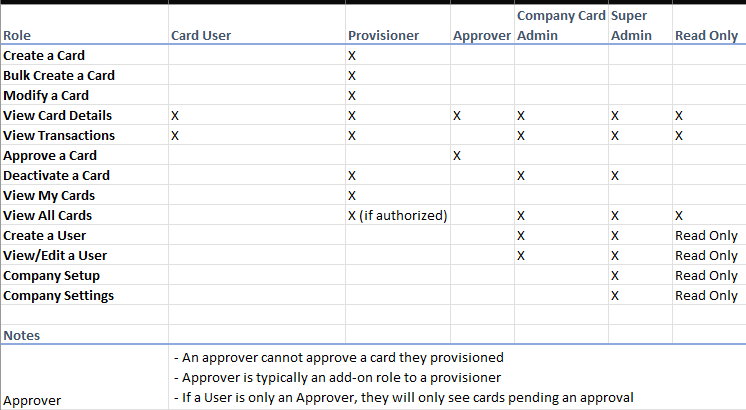
Card user. Card users are individuals who have a provisioned Instant Card to make purchases. Card users can access Instant Card only using the mobile app.
Provisioner. Provisioners primarily create cards for users. A U.S. Bank super admin user or a card company administrator can add a provisioner using the Administrator portal. Provisioners cannot receive an Instant Card to make purchases.
Approver. Approvers can approve cards that exceed a set monetary threshold for the program. If the company is not using an approval process, this role is unnecessary. A U.S. Bank super administrator or a card company administrator can add an approver using the administrator portal. Approvers cannot receive an Instant Card to make purchases.
Card company administrators. Card company administrators can add new provisioners and approvers. They can also change basic controls, such approval limits and the ability for card users to request cards.
Administrator read-only. Administrator read-only users are internal U.S. Bank users who can see information on the Super Admin site but not make any changes.
Super administrator. Super administrator users can add new companies, add and modify users, and review open cards across companies. This role is for U.S. Bank internal use only for select teams that need to directly support customers.
User registration
Registering a card user
A card user cannot use the Card app unless a provisioner creates a card for them. If a card user tries to log in or register for an account, then the process fails.
Troubleshoot: Registration of a card user
If a card user says they cannot register, check two things:
One. Confirm that a provisioner has created a card for them.
Two. Check in the Administrator portal to see if the card user has a profile.
Registering all other roles
We add all other roles to Instant Card using the Administrator portal. For detailed information, refer to User registration: Provisioner/Approver/Card Company Admin on page
Email messages
A user receives only emails from the bank. We do not use any test messaging or phone communications at this time.
The user will get an email when they:
- First register
- Receive a card
- Request a One-Time-Passcode (OTP)
- Have a card deactivated
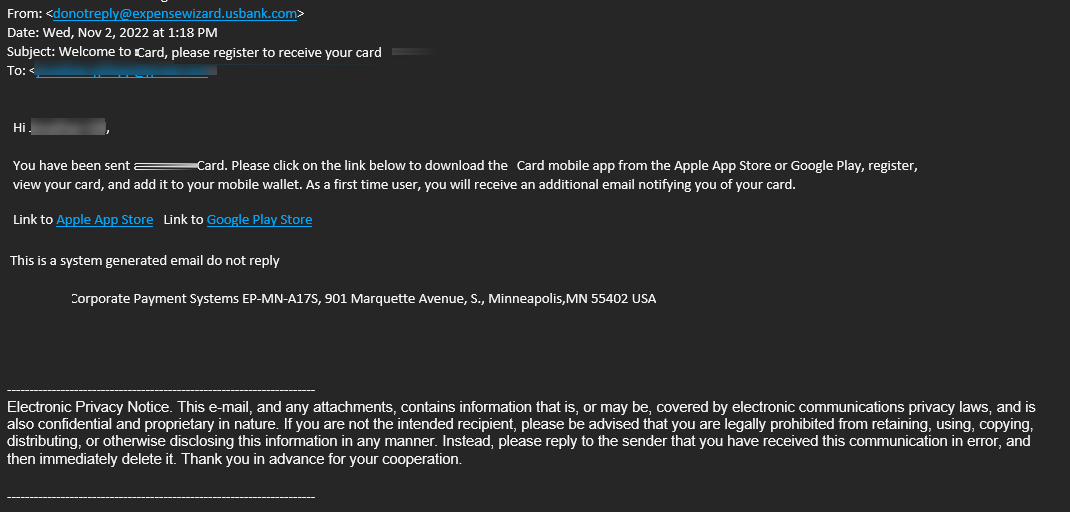
Emails come from donotreply@expensewizard.usbank.com, or donotreply@easypay.elanfinancialservices.com
You can see a sample email below.
Troubleshoot: Email messages
The email system may drop an email from time to time. If a user does not get an email, tell the user to check their email spam folders. For large organizations, especially local governments and schools, their fire walls may also block our email address. They can also select to resend the code. A customer’s firewall may also be blocking emails to the cardholder’s email address.
Introduction
Accounts overview
Your organization has two linked managing accounts for your virtual card program:
Payment account
Single-use account pool
Each card has a 16-digit account number from the single-use account pool and rolls up to the payment account for central billing.
Example: Full credit limit used
The cardholder has charged the full $1,200 credit limit on a card. You deactivate the card so the cardholder cannot see the card anymore. If the cardholder needs more money, you should create a new card for the cardholder. After your organization pays the $1,200 back to the bank, that $1,200 is available again on the managing account for the issuance of cards.
Example: Partial credit limit used
The cardholder has charged a total of $500 on the card with a $2,000 credit limit. The card’s ending valid date passes and the card expires. The system automatically deactivates the card. The cardholder cannot see the card anymore. The $1,500 returns to the managing account credit and is available to use for other cards. After your organization pays the $500 of used credit back to the bank, the remaining $1,500 is available again on the managing account for the issuance of cards.